Free website to Figma plugin

Lift any website into Figma.

Paste a URL and get editable frames with auto layout, text styles, hover states, dark mode and clickable prototype links. Pages behind a login work too, with the Chrome extension.

Free on Figma Community and the Chrome Web Store. No account, no import limits.

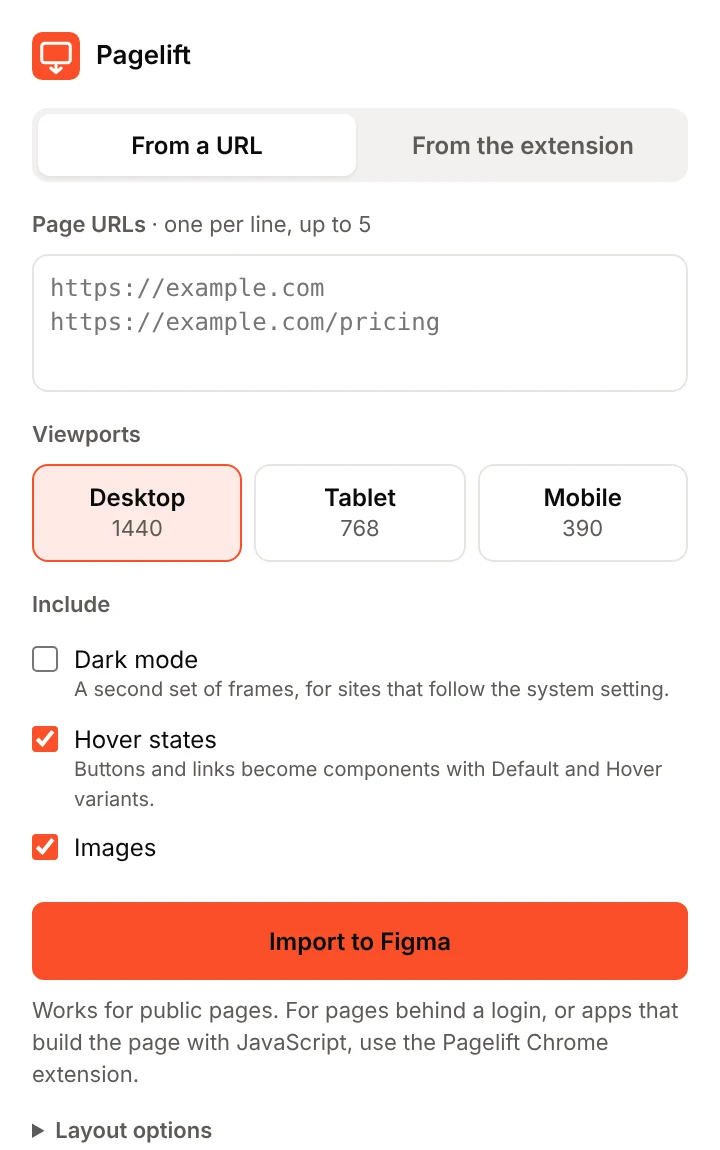
The Pagelift plugin window in Figma, with a URL field, viewport choices and options for dark mode, hover states and images

What you get

A website to Figma converter that keeps the structure

Pagelift reads the page the way the browser draws it, then rebuilds it with real Figma features instead of a flat screenshot.

Two ways in

Paste a URL, or capture pages behind a login

In the Figma plugin

From a URL

Paste up to five page addresses, pick screen sizes, and import. Best for public marketing sites, landing pages and docs.

  • Nothing to install besides the plugin
  • Links between the pages you import are wired automatically
  • Page scripts don't run, so apps that build the page with JavaScript may come in incomplete

With the Chrome extension

From your own tab

Capture any page you can open in Chrome: dashboards, admin panels, staging sites and localhost. Then drop the file into the plugin.

  • Works on pages behind a login
  • The capture stays on your computer
  • Handles apps that build the page with JavaScript

Compare

Pagelift next to the alternatives

Based on each tool's public docs and listings, checked 5 October 2026. "Not stated" means we couldn't find it documented, not that the tool can't do it.

Feature PageliftEnclave Studios Web to FigmaImarti Creations html.to.design‹div›RIOTS Figma Chrome extensionFigma
Price Free

No limits, no paid tier.

Freemium

Free tier has limited imports. PRO unlocks unlimited imports.

Freemium

Free: 10 imports every 30 days. PRO: $12/month billed yearly, $18 monthly.

Free

Available on all Figma plans.

Import by URL Yes

Public pages, up to five at a time.

Yes Yes No

Captures from Chrome.

Pages behind a login Yes

With the Chrome extension.

Not stated Yes

Via its Chrome extension.

Not stated
Desktop, tablet and mobile Yes

1440, 768 and 390 px in one import.

PRO

Custom viewport sizing is a PRO feature.

Yes

Included free.

Not stated
Auto layout Yes

Applied only where it doesn't move anything.

Not stated Yes Implied

Docs mention padding and gap on captured frames.

Colour and text styles Yes

Local styles, applied to layers.

PRO

Style imports are a PRO feature.

Yes No

Plain layers. Can bind existing variables.

Hover states Yes

Component variants with "While hovering".

Not stated Yes Not stated
Dark mode Yes

For sites that follow the system setting.

Not stated Yes Not stated
Prototype links Yes

Between imported pages, #anchors and outside links.

Not stated Yes

Automatic linking, included free.

Not stated
Installation One click

Figma Community and Chrome Web Store.

One click

Figma Community and Chrome Web Store.

One click

Figma Community and Chrome Web Store.

One click

Chrome Web Store.

Figma in the browser Yes

Browser and desktop app.

Yes Yes Yes
Support Best effort

A small studio. Email us.

PRO

Priority support with PRO.

Yes

Discord, premium support with PRO.

Yes

Figma Help Center.

How it works

From a web page to a Figma prototype in three steps

  1. Choose the page

    Paste URLs into the Pagelift plugin, or click Capture page in the Chrome extension for pages behind a login.

  2. Pick what to bring

    Choose Desktop, Tablet or Mobile, and turn on dark mode, hover states and images.

  3. Import to Figma

    Each screen size becomes a frame with named layers, auto layout, styles, hover variants and working links.

Install

Install in one click

Start with the Figma plugin. Add the Chrome extension when you need pages behind a login.

Figma Community

Pagelift for Figma

Import websites by URL, or drop in captures from the Chrome extension. Works in Figma in the browser and the desktop app.

  1. Open Pagelift on Figma Community.
  2. Click Open in… and choose a design file.
  3. Next time, search for Pagelift in Figma's Actions menu.
Get Pagelift for Figma

Chrome Web Store

Pagelift — Capture

Capture any page you can open in Chrome, including dashboards, staging sites and localhost, then drop the file into the plugin.

  1. Open Pagelift — Capture in the Chrome Web Store.
  2. Click Add to Chrome.
  3. Pin it from the puzzle-piece Extensions menu in your toolbar.
Add to Chrome

Developers can still download the source (zip, includes the proxy for URL import).

Questions

Good to know

How do I convert a website to Figma for free?

Install the free Pagelift plugin from Figma Community, paste the website's URL and click Import to Figma. You get editable frames, auto layout, text, images and styles, with no account and no limit on imports. For pages behind a login, capture them with the Pagelift Chrome extension and drop the file into the plugin.

Is Pagelift a free alternative to html.to.design?

For many uses, yes. Both turn websites into editable Figma layers, import by URL, capture logged-in pages with a Chrome extension, and handle hover states, dark mode and multiple screen sizes. Pagelift is free with no import limit. html.to.design's free plan allows 10 imports every 30 days, and it's more established, with dedicated support. The comparison table above has the details.

Is it really free forever?

Yes. There's no account, no trial and no paid tier planned. Captures from the Chrome extension run entirely on your computer, and URL import uses a small proxy that costs us very little to run.

Where does my page data go?

With the Chrome extension, nowhere: the capture is saved as a file on your computer and the plugin reads that file. With URL import, the page and its files pass through Pagelift's proxy on Cloudflare so the plugin can read them. The proxy doesn't keep or log them. The privacy policy has the details.

Why do some pages come in incomplete from a URL?

URL import doesn't run the page's scripts, so apps that build the page with JavaScript, and sites that block automated visitors, may come in partly empty. Capture those with the Chrome extension instead, which reads the page exactly as your browser shows it.

Why does Chrome show "started debugging this browser"?

That's how the extension resizes the page to tablet and mobile widths, switches dark mode on and triggers hover states. The bar disappears when the capture finishes.

How do I find Pagelift in Figma?

After you open it once from Figma Community, search for Pagelift in Figma's Actions menu. A plugin called "Web to Figma" is unrelated.

Can I import someone else's website?

Pagelift imports whatever your browser can show. Use it for your own products, client work you're permitted to use, and reference. Respect copyright and trademarks.